
Drag & Drop Signature Designer
Block-based editor with text, image, link, social, divider and banner blocks. Live preview. All without code.
Professional email signatures for your entire organisation. Signaturmonster automatically appends signatures, disclaimers, branding and marketing banners – regardless of whether your employees use Thunderbird, Outlook, Apple Mail or Mailcow.
Email Signature Software · Centralized Signature Management
Signaturmonster is a self-hosted email signature software for central management of signatures, CI branding and email disclaimers. The core is an SMTP proxy: instead of sending emails directly to the mail server, they first pass through Signaturmonster — the proxy checks the sender address, selects the matching signature, adds a disclaimer and forwards the finished email. No plugin, no client configuration, no manual step. Set up once, consistently applied to all senders.
Because the injection happens at the SMTP level, Signaturmonster works with virtually every email client and system — unlike Microsoft 365 plugins or Exchange transport rules, which do little outside of Outlook. Thunderbird users additionally benefit from the integrated addon, which shows the finished signature already in the compose window as a live preview. For signatures with animated GIF banners, Outlook recipients automatically receive a static PNG as fallback — all other clients see the animation. Compatible with Thunderbird, Outlook, Apple Mail, Roundcube, Mailcow, JTL-Wawi, Lexware and every other SMTP-capable system.
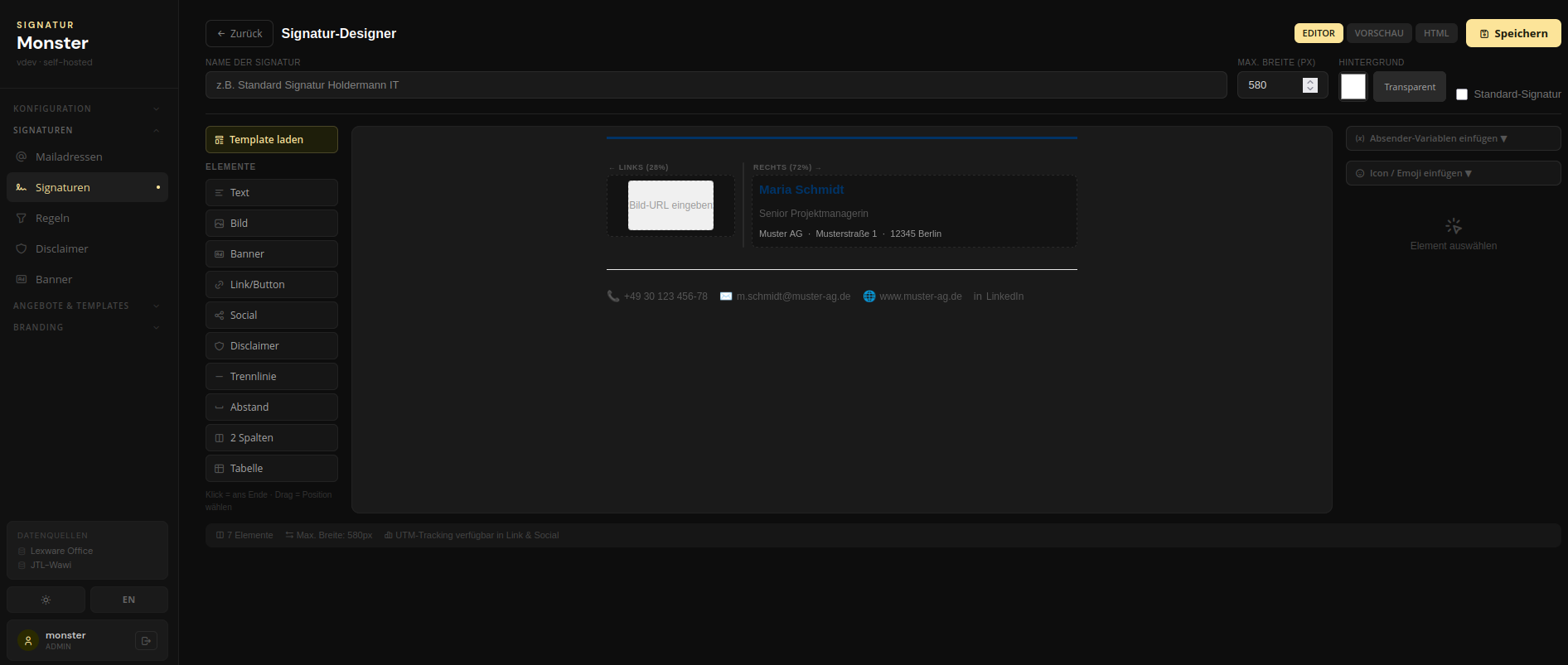
Signatures are assembled comfortably in the integrated Drag&Drop designer — without any code. Text, logo, social links, dividers, banners: all blocks arranged by drag & drop, freely designed and with live preview directly in the browser. Changes take effect immediately for all senders.
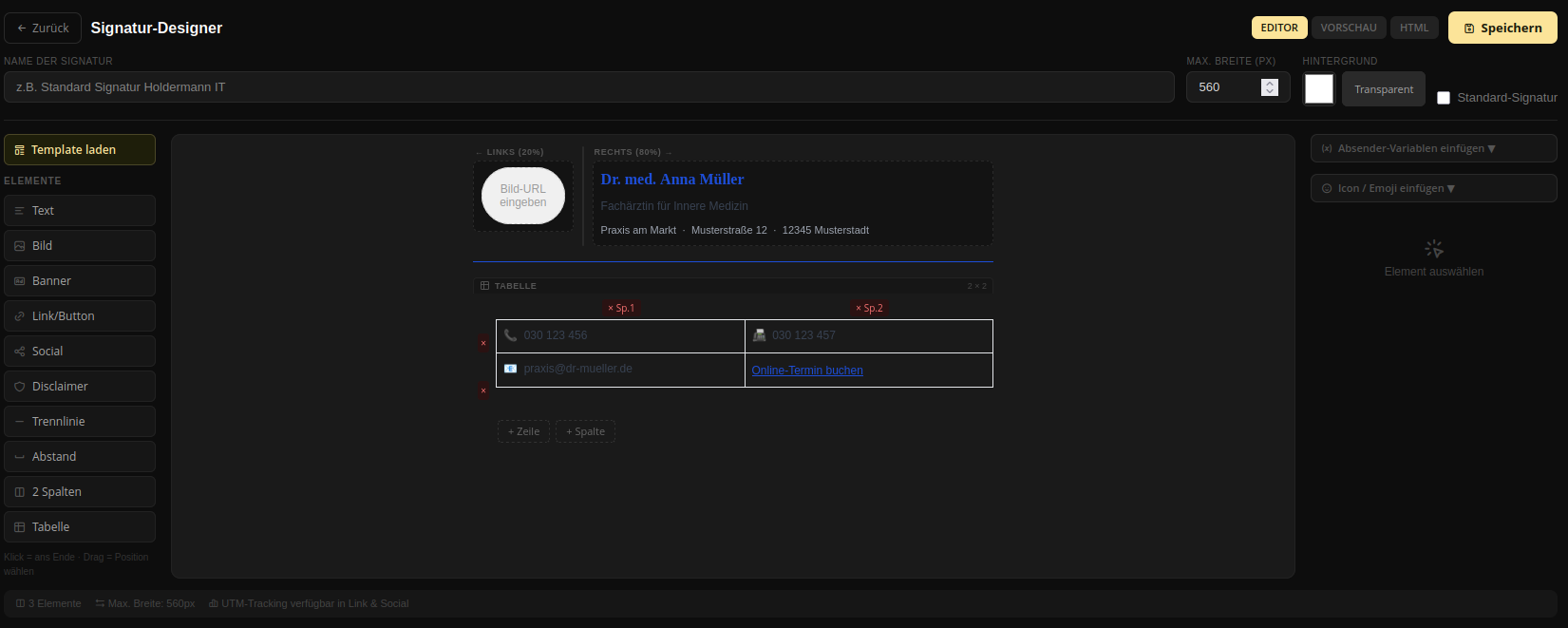
Most importantly: your emails never leave your own server. No SaaS provider processes your emails, no external services are required. Emails pass exclusively through your server and the respective mail provider — nowhere else. GDPR compliant by design. Run Signaturmonster on a NAS, Proxmox LXC, Raspberry Pi or VM — wherever Docker runs, with a single docker compose up -d.
Example Signatures
Every signature individually designed — with logo, colors, banners and social links.
|
Ltd.
|
Max Mustermann
Managing Director · Sample Company Ltd.
📞 +49 7841 123 456
✉ m.mustermann@samplecorp.com
🌐 www.samplecorp.com
LinkedIn
Twitter
|
|
Dr. med. Anna Müller
Specialist in Internal Medicine
📞 +49 761 999 0001
✉ dr.mueller@medical-center.de 🌐 medical-center.de |
How it works
One-time setup: redirect the SMTP server in your email client to the proxy — after that everything runs automatically in the background.
Change the SMTP server in your email client once to the IP address of the device running Docker. Works with Thunderbird, Outlook, Apple Mail and any other SMTP client — just a different server address.
Signaturmonster runs in Docker — on your own PC, a NAS, Proxmox or a home server. The web UI is accessible via the IP address of the respective device, as long as Docker is running.
Every outgoing email is intercepted, the signature injected, CI branding applied and the animated GIF banner (with Outlook fallback) embedded.
All Features
From simple HTML signatures to fully automatic CI branding with animated GIF banners.
Block-based editor with text, image, link, social, divider and banner blocks. Live preview. All without code.
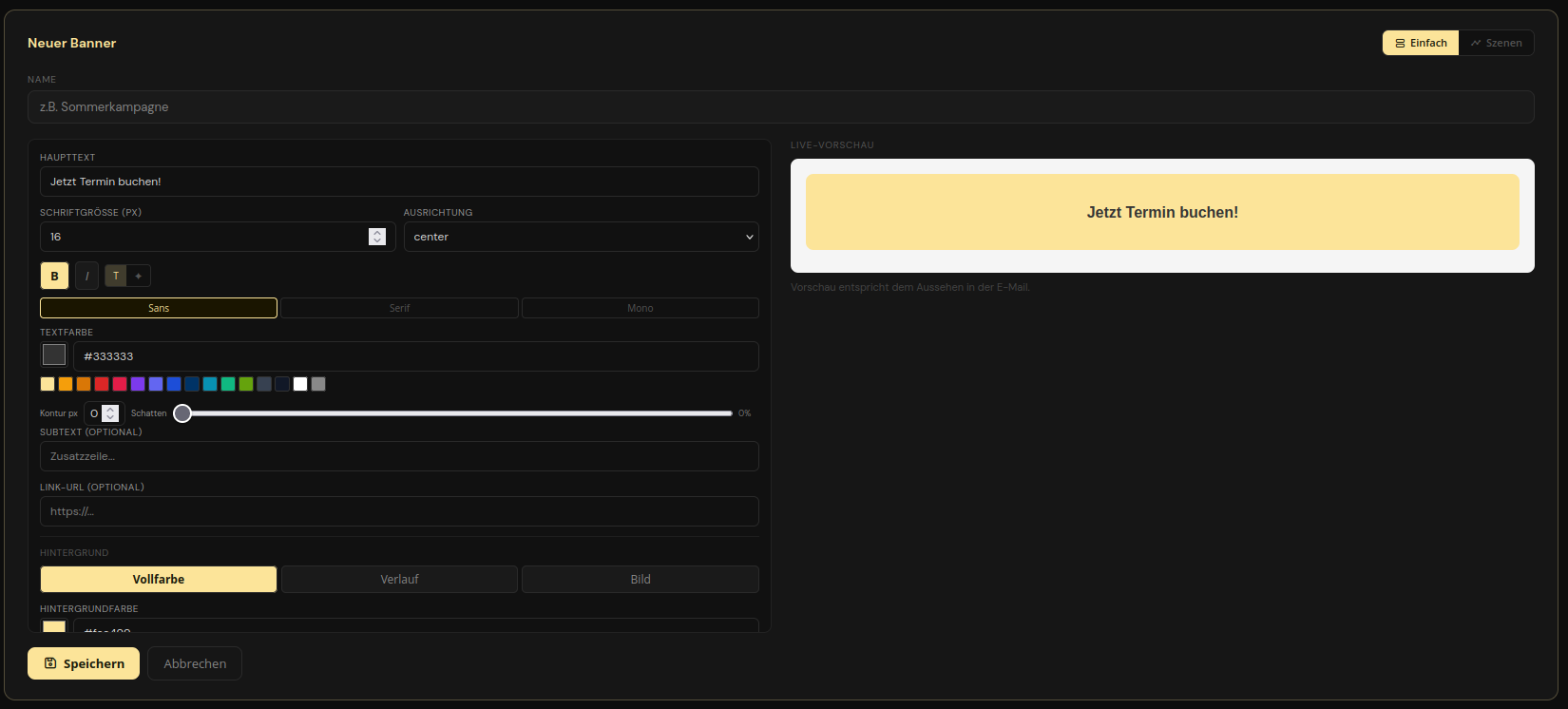
Complete GIF generator directly in the browser: multiple scenes, transitions, text animations (Fade, Slide), backgrounds (color / gradient / image / pattern).
CI profiles with logo, colors and fonts. Signaturmonster automatically embeds the mail body into your corporate design — every outgoing email looks professional and consistent.
Rules by sender address. Different signatures per sender — with optional CI profile and disclaimer. Flexible and clear.
MSO Conditional Comments: Outlook automatically receives a static PNG as fallback, all other email clients see the animated GIF. CID inline embedding — no external URLs.
Signatures use {{vorname}}, {{nachname}}, {{firma}}, {{telefon}} and more — automatically filled from the sender database.
Manage multiple SMTP users, senders and accounts. Role-based access to the web UI. Ideal for teams and agencies.
No cloud dependency. Your emails remain on your server. No SaaS, no vendor lock-in, full control.
Configurable HTML and text disclaimers are automatically injected into every outgoing email. Legally compliant, centrally manageable.
Why Signaturmonster?
No cloud required, no Microsoft 365, no per-user fees.
Signaturmonster runs entirely on your own infrastructure. No SaaS provider, no external services — your emails stay where they belong. GDPR-compliant by design.
Thunderbird, Outlook, Apple Mail, Roundcube, Mailcow — whatever system your employees use, the SMTP proxy handles it. No plugins, no client configuration needed.
Many signature solutions require Exchange Online or Microsoft 365. Signaturmonster works with any SMTP-capable mail server — fully on-premise if you want.
No costs per employee. Signaturmonster is priced by instance size — from Free to Business, there's a flat annual tier for every team size.
Banners & Animations
The integrated GIF generator allows you to create multi-scene banners with transitions, text animations and individual backgrounds — without external tools, without Photoshop.
Self-hosted & Source Available
Signaturmonster runs completely on your own infrastructure — a single docker compose up is enough.
Five containers, one command. SMTP proxy, backend API, React frontend, nginx reverse proxy and updater service come as a ready-made Compose file.
docker compose up -dSource code is viewable on GitHub — no vendor lock-in, no hidden dependencies. Licensed for self-hosting with a valid license.
github.com/choldermann/signaturmonsterYour emails never leave your server. Run Signaturmonster on a NAS, Proxmox LXC, Raspberry Pi or your own VM — wherever Docker runs.
SQLite · FastAPI · aiosmtpdThunderbird Integration · Signature Addon
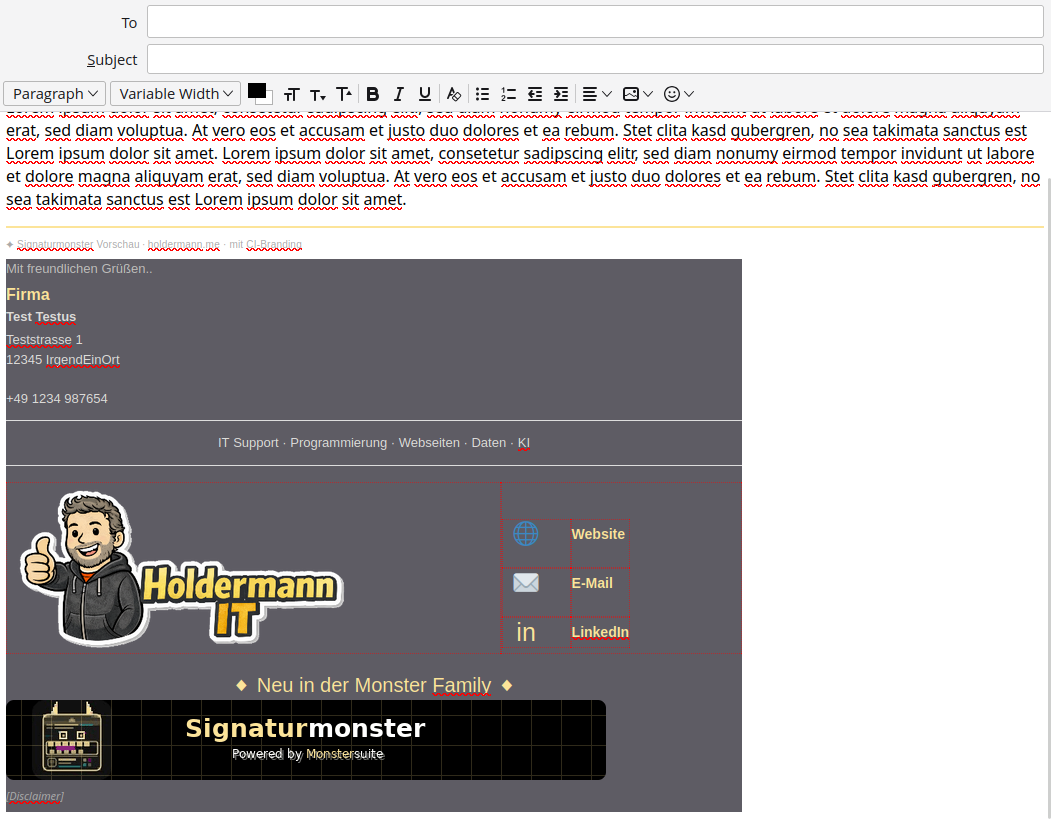
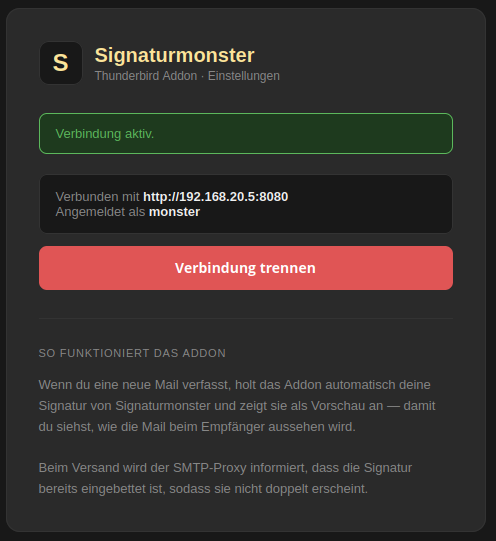
The official Signaturmonster addon for Thunderbird automatically synchronizes signatures from your instance — visible in the compose window before you click send.
Install in 4 steps
Download signaturmonster.xpi above and save it locally.
In Thunderbird: Extensions → Install Add-on from File → select .xpi.
In the addon settings, enter the server URL and credentials of your Signaturmonster instance.
Compose a new email — the signature appears automatically. The golden ✦ bar shows which rule applies.
Who is Signaturmonster for?
From individuals to IT service providers — Signaturmonster adapts to your infrastructure.
Consistent signatures for all employees, CI-compliant and centrally maintained. No manual distribution, no chaos — one change applies immediately to everyone.
Deployable for multiple clients, Docker-based and easily scalable. Signaturmonster can be configured separately for each client.
SMTP-native integration without cloud lock-in. Runs as a Docker container directly alongside Mailcow, Postfix or any other mail server.
The Thunderbird addon is a true differentiator: manage signatures centrally and still see them live in the compose window — automatically for every user.
Frequently Asked Questions
Answers to the most common questions about centralized email signature software, Thunderbird integration and self-hosting.
Signaturmonster works as an SMTP proxy: all outgoing emails pass through the software, which automatically adds signature, CI branding and disclaimer. Signatures are maintained once centrally in the web UI — one change applies immediately to all senders, regardless of the email client.
Yes — Thunderbird is one of the best-supported clients. There is an official Thunderbird addon that synchronizes signatures directly from Signaturmonster and shows them live in the compose window. The SMTP proxy and the addon work together, so the signature is neither injected twice nor needs to be maintained manually.
Yes. The official Thunderbird addon (WebExtension, .xpi) is available for free. After installation it connects to your Signaturmonster instance and automatically shows the correct signature when opening the compose window — including variables, CI branding and disclaimer notice. Compatible from Thunderbird 91.
Yes. Since Signaturmonster works at SMTP level, Outlook, Thunderbird, Apple Mail and any other clients can be used simultaneously — each configures the SMTP proxy as the outgoing mail server. All automatically receive the correct signature, CI branding and disclaimer.
Yes. Since Signaturmonster works as an SMTP proxy, it is completely independent of the email client. Outlook is simply switched to use the proxy as the outgoing mail server. Outlook recipients automatically receive a static PNG as fallback for signatures with animated GIF banners (via MSO Conditional Comments).
Yes — by design. Signaturmonster runs completely on your own infrastructure. Your emails are processed exclusively on your own server and there is no connection to external SaaS services or cloud platforms for email delivery. When an email arrives at the SMTP proxy, it is briefly stored in a local queue (SQLite) on your server before being processed and forwarded. No permanent copy is created.
No — this is not a missing feature, but an architectural consequence. Signaturmonster modifies email content (signature, branding, disclaimer). A subsequent cryptographic signature could not claim that the sender authorized exactly this content. This applies to all content-modifying mail systems, including commercial cloud solutions like Exclaimer or CodeTwo. The key advantage over cloud solutions: Signaturmonster runs on your infrastructure — no third party ever touches your emails.
If you require personal end-to-end signatures (e.g. law firms, authorities with qualified electronic signature requirements): sign cryptographically in your email client before the email reaches the proxy, and disable all proxy functions via #sm:off.
Yes. Under System → Mail Queue in the admin interface, all entries are visible with status (pending / sent / failed), sender, recipient and subject. Individual emails can be downloaded there — useful for debugging, audit purposes or manual review of failed delivery attempts. Failed entries can be re-queued directly from the UI.
It depends on the specific requirements. For qualified electronic signatures (QES) under eIDAS, the cryptographic signature must be set personally in the email client before the email reaches the proxy. Using #sm:off disables all proxy functions for these emails. For standard business emails without QES requirements, Signaturmonster is fully suitable. Gateway signing at the organizational level (organization signature, not personal E2E) is planned for a future release.
Yes. Signaturmonster runs alongside Mailcow without any issues — both run as Docker containers. Email clients are redirected to the Signaturmonster SMTP proxy, which forwards the processed emails to Mailcow. The integration requires no changes to the Mailcow configuration.
Yes. The Free version of Signaturmonster is permanently free and fully functional — with one sender, Drag & Drop signature designer, rule-based assignment, variable system and Thunderbird addon. For teams with multiple senders, CI branding and GIF banners, there are paid tiers.
An SMTP proxy is software that intercepts outgoing emails before they reach the mail server. The email client sends the email to the proxy — the proxy adds signature, disclaimer and CI branding and forwards the finished email to the real mail server. The process is completely transparent to the sender, no plugin or client modification needed.
No. Nothing changes on the mail server. You only change the outgoing SMTP server in the email client to the IP address where Signaturmonster is running (port 587). Signaturmonster then forwards the emails to your real mail server.
Yes. Any system that sends outgoing emails via SMTP can be redirected to Signaturmonster — including JTL-Wawi, Lexware, Sage, DATEV and other ERP and accounting solutions. Configuration is done in the SMTP settings of the respective software.
A one-line installer sets everything up: Docker images, configuration, SMTP relay. For Linux and macOS: curl -fsSL https://raw.githubusercontent.com/choldermann/signaturmonster/main/install.sh | bash. For Windows there is a PowerShell script. Prerequisite is a running Docker installation.
You need a device running Docker — that can be a home server, a NAS (Synology, QNAP), a Proxmox LXC, a Raspberry Pi or a rented VM. Signaturmonster must be reachable on the local network so email clients can use the SMTP proxy.
Yes. You can configure any number of sender addresses and domains (depending on the license tier). For each address, individual signatures, CI profiles and disclaimer rules can be set up. Rule-based assignment ensures the correct signature is always applied.
No — Outlook does not support animated GIFs in emails. Signaturmonster automatically generates MSO Conditional Comments: Outlook recipients receive the static PNG from Scene 1 of the banner as a fallback. All other clients (Apple Mail, Gmail, Thunderbird etc.) see the animated GIF. Both variants are embedded via CID inline.
Yes. Apple Mail supports standard SMTP and can be redirected to Signaturmonster without any issues. Apple Mail recipients also see animated GIF banners in full, since Apple Mail — unlike Outlook — supports GIF animations.
Yes. Roundcube and other webmailers can point to Signaturmonster via their SMTP configuration. This means users of self-hosted webmail installations also benefit from centralized signatures and disclaimers.
Disclaimer texts are stored centrally in the web UI — as HTML and plaintext variants. Signaturmonster automatically appends them to every outgoing email that matches a configured rule. If a disclaimer changes (e.g. legal form, address), one change in the web UI is enough — all subsequent emails immediately carry the new text.
Yes. Wherever Docker runs, Signaturmonster runs. Tested on Raspberry Pi 4, Synology NAS (Container Manager), QNAP, Proxmox LXC (Debian/Ubuntu) and standard Linux servers. Resource requirements are low — a Raspberry Pi 4 with 4 GB RAM is sufficient.
Limitations
As an SMTP proxy that modifies email content, there are structural boundaries. Being transparent about them is part of the concept.
Signaturmonster modifies email content — this is structurally incompatible with end-to-end encryption, whose core claim is "I signed exactly this content." This applies to all content-modifying mail systems, including commercial ones. The key difference from cloud solutions: Signaturmonster runs on your own infrastructure, no third party ever touches your emails. Anyone requiring personal E2E signatures signs in their email client before the proxy and disables all proxy functions via #sm:off.
Incoming emails are received by the SMTP proxy and first stored in a local queue (SQLite) on your server before processing and forwarding begins. Emails never leave your infrastructure at any point. Via System → Mail Queue in the UI, all entries are visible and can be downloaded — useful for debugging and compliance. This should be taken into account in your data protection concept.
Pricing
Signaturmonster runs self-hosted on your infrastructure — no cloud, no hidden costs.
For individuals and first steps. Fully functional, free forever.
For small teams with multiple senders and professional appearance.
For companies that need consistent branding and full functionality.
For IT service providers, agencies and companies with complex requirements.
All versions are self-hosted — your emails never leave your server.
Get Started
Our installer sets everything up — Docker images, configuration, SMTP relay. Run once, done.
Requirements: Docker Desktop (Windows/Mac) or Docker Engine + Compose Plugin (Linux) must be installed.
Behind Signaturmonster
Signaturmonster is a product of Holdermann IT — IT service provider from Sasbach near Achern, Germany.
Whether support, programming or data solutions: we help small and medium-sized businesses.
Fast help on-site or via remote maintenance — for businesses and private customers in the Achern, Sasbach and surrounding area.
holdermann.me ↗Custom software development, modern websites and tailor-made solutions — from idea to finished product.
holdermann.me ↗Data conversion, system migrations and automation — data from Excel, CSV, XML or databases cleanly transferred.
holdermann.me ↗The growing product family: Signaturmonster, Datenmonster and more tools — built for real SMB workflows.
monstersuite.de ↗